⚡ One drag down from the menu bar · Gentle native chime
Tockette
A timer, one drag from the menu bar.



25:00
Focus Session
Visual simulation. In the Mac app, you pull down directly from the menu bar to set instant timers with gentle chimes.
What it does
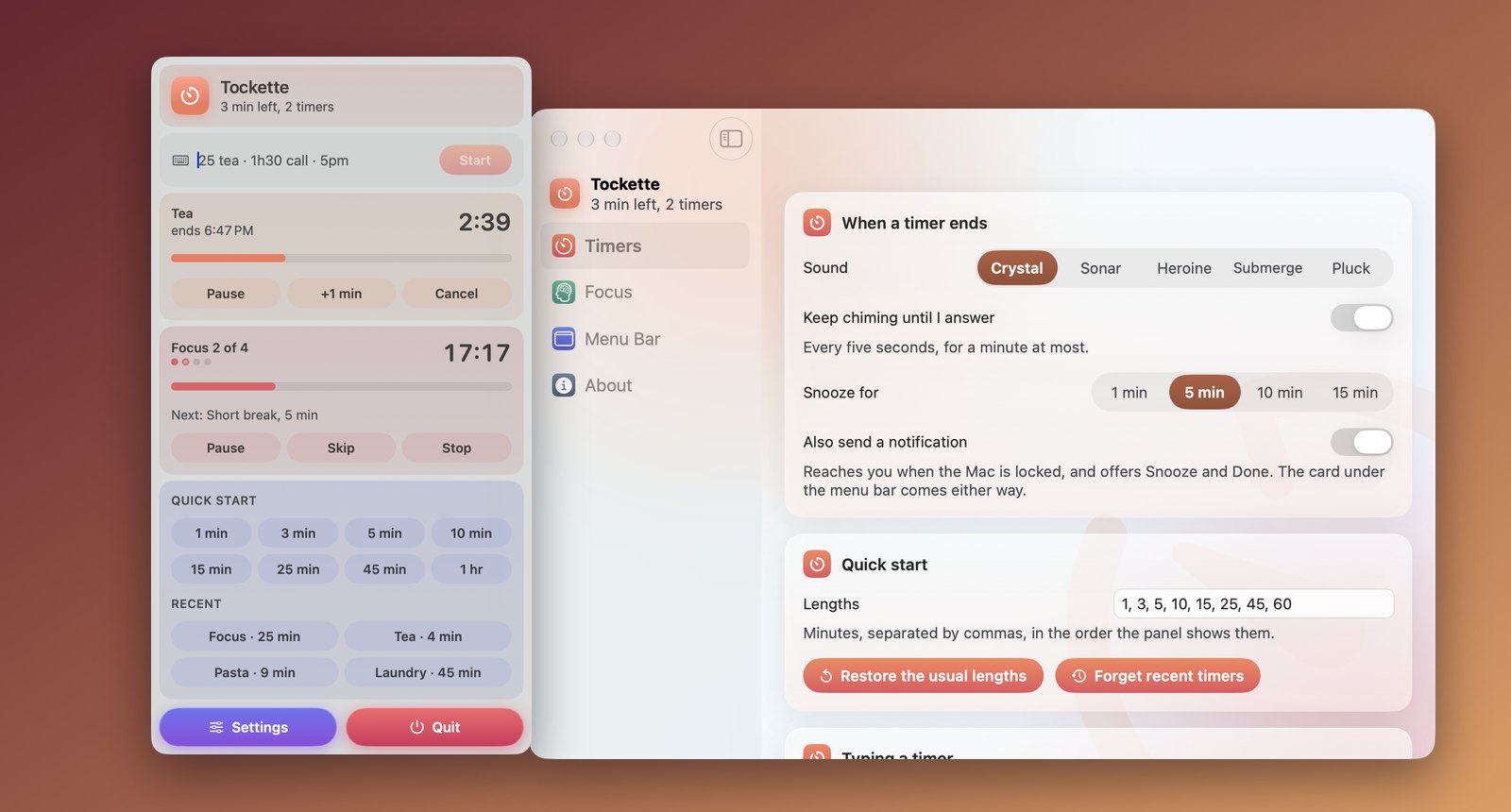
Tockette lives in the menu bar as a small dial. Drag down from it and let go to start a timer, a little way for a few minutes and further for up to four hours, or click it and type what you want.
- One drag: a bubble beside the pointer shows the length and when it will end. Let go and it is running.
- Or type it: 25 tea, 1h30 call, 90s eggs. A time sets an alarm instead: 5pm, 17:30 standup.
- As many as you need, each with its own name, pause, one more minute and cancel. The dial empties as the soonest one runs down.
- Hard to miss: when a timer is up, a card slides down from the menu bar with a chime, and offers Done, Snooze and Again. A notification with the same buttons reaches you even when the Mac is locked.
- Quick start: one click for your usual lengths, and the named timers you set recently.
Requires macOS 14 Sonoma or later.
Clunky timer apps vs Tockette
Start a timer in under two seconds without disrupting your flow.
| Aspect | Generic Timer Apps | Tockette |
|---|---|---|
| Setting Time | Opening large windows, clicking tiny arrows and popups | A single fluid drag down directly from the menu bar |
| Visual Glance | Hidden in the Dock or cluttering desktop space | Discrete circular countdown slice right in the menu bar |
| Alarm Sound | Harsh jarring buzzer that startles you and your calls | Gentle harmonic synthesized chime that never startles |
| Natural Entry | Rigid hour:min:sec spinners and complicated forms | Type natural labels like '25 tea' or '15 laundry' |
| Resource Use | Heavy multi-megabyte frameworks and sluggish startup | Pure Swift native macOS footprint: instant and tiny |
Privacy in one paragraph
Tockette has no network access, no account and no tracking. Your timers and their names stay on your Mac. The full privacy policy says the same at more length.
More apps from the same maker
Small apps, each made to do one thing well. No accounts, no ads, and none of them tracks you.
 StatuetteCPU, memory, disk and network in your menu bar.Mac
 ZonetteEvery time zone you care about, one click away.MaciPhone & iPadAndroid
 LunetteThe Moon and the Sun, at a glance.MaciPhone & iPadAndroid
 LunaretteThe lunar calendar, in four traditions.MaciPhone & iPadAndroid
 PausetteGentle breaks for your eyes and your back.Mac
 PoisetteSit tall, reminded by the AirPods you wear.MaciPhone & iPad
 HushetteCalm ambient sound that never loops.MaciPhone & iPadAndroid
 TapsodyMechanical keyboard sounds as you type.Mac
 ThrumlineYour heart rate, live in the menu bar.MaciPhone & iPadAndroid
 NightjarKeep your Mac awake. Honestly.Mac
 UmbretteDim everything but the window you work in.Mac
 PrompetteA teleprompter right under your camera.MaciPhone & iPadAndroid
 TalletteA paper tape for your sums.MaciPhone & iPadAndroid
 ProbetteEverything technical about a media file, in words.MaciPhone & iPadAndroid
 BindetteTurn audio files into one proper audiobook.MaciPhone & iPadAndroid
 LettretteOpen winmail.dat and .msg files, as they were sent.MaciPhone & iPadAndroid
 Nhanh TayPut four answers in order. Fast.MaciPhone & iPadAndroid
 PinetteNotes you keep in sight.MaciPhone & iPadAndroid
 UsagetteClaude usage limits in your menu bar.Mac
 SquiggoDraw along with a friendly buddy.MaciPhone & iPadAndroid
 ForemanJobs, quotes and invoices for trades.MaciPhone & iPadAndroid
 TilewakeA sliding puzzle whose pictures wake up.MaciPhone & iPadAndroid
 Chăm luyệnVietnamese primary-school practice, read aloud.MaciPhone & iPadAndroidWindows
 SalahPrayer times for the whole family.MaciPhone & iPadAndroid
 KittiwakeAsk the news a question, watch one signal.MaciPhone & iPadAndroid
 ReadetteFree related reading for any article linkMaciPhone & iPadAndroid
 TinkerhallSee how everyday machines work, one part at a time.MaciPhone & iPadAndroid
 SnaplineCall the beam that breaks first.MaciPhone & iPadAndroid
 LeafetteCollect on one leaf, write on the other.MaciPhone & iPadAndroid
 WhenceHow inventions connect.MaciPhone & iPadAndroid
 WhimbrelShape a living world, then walk through it.MaciPhone & iPadAndroid
 PendulinePlan, preview and braid Japanese kumihimo cords.MaciPhone & iPadAndroid
 PhalaropeDesign spinning animation discs, plates and cups.MaciPhone & iPadAndroid
 TurnstoneDesign tablet-woven bands, then weave them pick by pick.MaciPhone & iPadAndroid
 RedknotDesign Celtic knotwork that weaves itself.MaciPhone & iPadAndroid
 SanderlingDesign bobbin lace, then work it stitch by stitch.MaciPhone & iPadAndroid
 DotterelDesign temari balls in 3D, then stitch them step by step.MaciPhone & iPadAndroid
 GodwitDesign real sundials, then print or cut them.MaciPhone & iPadAndroid
 DunlinRecord once. Get a vertical and a horizontal video, and reframe both after the take.iPhone & iPadAndroid
 AvocetCopy the colour of a picture you love onto your own shots, and take it anywhere as a 3D LUT.MaciPhone & iPadAndroid
 GreenshankA cooking game where the heat is real: watch it spread, slide food off the hot spot, flip at the right moment.MaciPhone & iPadAndroid
 WilletA music-box puzzle: hear a tune, then build a little machine of beads and bells that plays it back.MaciPhone & iPadAndroid
 CourserOne swipe, one floor. Climb a sea cliff and a lighthouse to the lamp, ahead of the rising tide.MaciPhone & iPadAndroid
 SurfbirdRecord a part, play along with it, and stack four tracks on tape. Every overdub lands in time.MaciPhone & iPadAndroid
 CurlewJoin, break and flip numbered stones until every nest holds its exact number.MaciPhone & iPadAndroid
 YellowlegsPull the pins in the right order: seeds and water in the pot, embers out.MaciPhone & iPadAndroid
 TattlerFive classic pencil logic puzzles, with hints that explain each step.MaciPhone & iPadAndroid
 SmewMarble paper on your phone: drop, comb and swirl paint, learn ebru patterns.MaciPhone & iPadAndroid
 BrolgaWatch contra dances move, write your own, check they work and practise calling.MaciPhone & iPadAndroid
 LapwingBuild the ladder so every bead lands in its colour.MaciPhone & iPadAndroid
 PratincoleDesign stained-glass panels, catch hard cuts, lay templates on your real glass.MaciPhone & iPadAndroid
 FulmarDesign single-line kites, set the bridle, print true-size panels to cut and sew.MaciPhone & iPadAndroid
 BitternColour your egg design and get its wax-and-dye order, step by step.MaciPhone & iPadAndroid
 KilldeerAgility and Hoopers courses to scale, measured and rule-checked.MaciPhone & iPadAndroid
 WrybillBuild marble machines that count, add and remember.MaciPhone & iPadAndroid
 DowitcherRead seismograms, find the epicenter, measure the quake.MaciPhone & iPadAndroid
 DovekieClassic two-player games against a perfect solver that shows why.MaciPhone & iPadAndroid